
Smart Speakers vs. Smart Displays: How the Extra Screen Changes the Experience

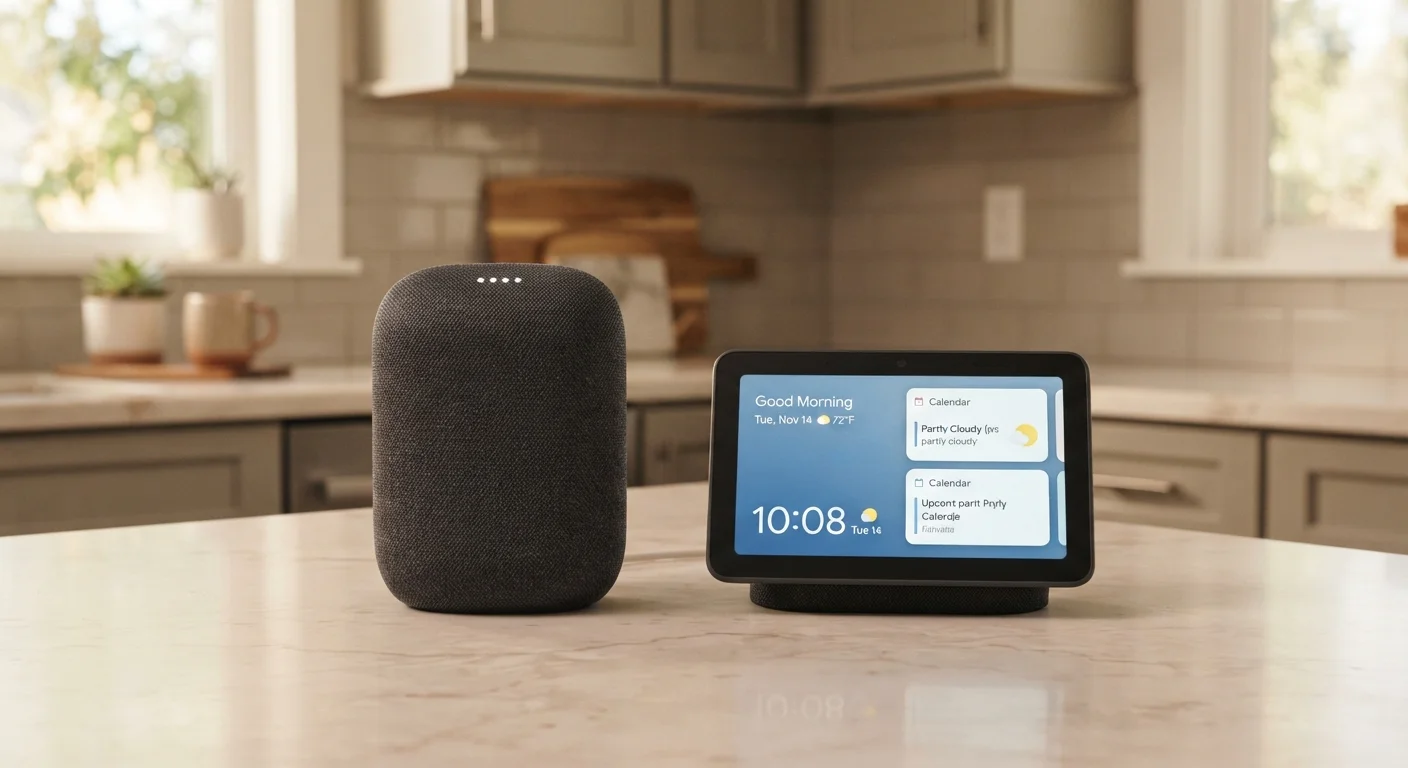
Key Takeaways
- Smart displays do everything a smart speaker does, but add a touchscreen for visual feedback and interaction.
- The screen meaningfully improves video calling, recipe following, and media browsing experiences.
- Smart speakers remain excellent for audio tasks and rooms where a screen would feel intrusive.
- Smart displays typically cost more and consume more power than comparably featured smart speakers.
- Your primary use case - not the feature list - should guide which device fits your home.
Option A
Smart Speaker
The voice-first, eyes-free home assistant.
Best for: Households that want hands-free help with audio tasks, home control, and quick questions without adding a screen to the room.
Option B
Smart Display
A smart speaker with a touchscreen that shows as well as tells.
Best for: People who want visual context alongside voice responses - especially for video calls, recipes, and media playback.
If you primarily use a smart assistant for music, timers, and smart home control
Smart Speaker
Voice-only interactions cover all of these tasks efficiently. A screen adds cost without meaningfully improving the experience.
If you want to make regular video calls from a common area like the kitchen
Smart Display
A fixed, hands-free screen in a common area is far more practical for video calling than holding a phone or positioning a laptop.
If you cook frequently and follow step-by-step recipes
Smart Display
Visual recipe cards with ingredient lists and step navigation are genuinely useful when your hands are occupied at the stove.
If the device will live in a bedroom or private space where screen glow is unwelcome
Smart Speaker
Smart speakers blend more easily into low-light environments without contributing to screen exposure before sleep.
If you're just starting out with smart home devices and want something approachable
Smart Speaker
Smart speakers are simpler to set up and use, making them a lower-commitment entry point into the smart home ecosystem.
What Both Devices Actually Do
Smart speakers and smart displays are both voice-assistant hubs. They connect to your home Wi-Fi, respond to a wake word, and let you ask questions, set reminders, play music, or control compatible smart home devices - all without touching a screen or opening an app.
If you're brand new to this category, our guide for smart home newcomers explains the broader ecosystem and how these devices fit into it.
The difference between a smart speaker and a smart display isn't about what the voice assistant knows - both run the same underlying assistant software. The difference is entirely in how that assistant communicates information back to you. A smart speaker answers in audio. A smart display answers in audio and on screen.
| Criterion | Smart Speaker | Smart Display |
|---|---|---|
| Output method | Audio only | Audio + touchscreen |
| Video calling | Not supported | Supported via built-in camera |
| Recipe assistance | Read-aloud steps only | Visual step-by-step cards |
| Media browsing | Voice commands required | Visual thumbnails + touch |
| Smart home camera feeds | Not available | On-screen live view |
| Physical footprint | Compact, easy to place anywhere | Larger; needs a flat, visible surface |
| Typical price range | Lower | Higher |
| Screen glow / ambient light | None | Present; adjustable brightness |
Where the Screen Actually Changes Things
It's easy to dismiss the display as a novelty, but there are specific tasks where visual output genuinely shifts the experience.
Video Calling
A smart display placed on a kitchen counter or living room shelf becomes a shared, hands-free video calling station. Unlike a phone or tablet, it stays put, always ready, without requiring anyone to hold it. For households that regularly call family members, this is one of the most tangible practical benefits.
Cooking and Recipes
When you ask a smart display to walk you through a recipe, it shows each step on screen while you work. You can glance at the ingredient list, tap to advance to the next step, and keep your hands free. A smart speaker can read steps aloud, but you lose your place easily and can't skim ahead without interrupting the flow.
Media Browsing and Playback
Scrolling through music albums, browsing a YouTube playlist, or selecting a podcast is significantly easier when you can see thumbnails and titles. Smart speakers handle media well when you know exactly what you want; smart displays reduce the mental load of remembering precise names or titles.
~40%
US adults who own a smart speaker
According to Pew Research Center survey data, roughly four in ten US adults reported owning a smart speaker, making it one of the most widely adopted smart home device categories.
2-3×
Typical price difference vs. smart speaker
Smart displays generally cost two to three times more than entry-level smart speakers in the same product family, largely due to the screen and integrated camera.
Security Camera Feeds
If you have smart home cameras, a smart display can pull up a live feed on demand - useful for checking who's at the door without reaching for your phone.
Where the Screen Adds Little
The display doesn't improve every interaction. For timers, alarms, math conversions, weather forecasts read aloud, and general trivia questions, the audio response is immediate and sufficient. Adding a screen to these tasks doesn't make them faster or more useful.
Smart speakers also tend to be physically smaller, making them easier to tuck into a bookshelf, nightstand, or bathroom without dominating the space. And because they draw less power and are mechanically simpler, they generally run quieter and blend into the background more naturally.
There's also a screen-time consideration worth acknowledging. A glowing display in a room can pull attention in ways that an audio-only device doesn't. If you're thinking carefully about how screens fit into your home environment - particularly in shared family spaces - our piece on managing screen time as an adult explores how device design influences attention habits.
Privacy Note on Built-In Cameras
Most smart displays include a camera for video calling, which some users find raises privacy questions. Many models include a physical shutter or a hardware switch to disable the camera and microphone when not in use. If this is a concern, reviewing the specific privacy controls on any device before setting it up in a shared space is a reasonable precaution.
Cost and Practical Trade-Offs
Smart displays carry a noticeable price premium over comparable smart speakers. That gap reflects the cost of the touchscreen panel, the camera (included in most models for video calling), and the more complex housing required to hold everything together.
Neither device type is dramatically expensive, but the difference matters when you're outfitting multiple rooms. A household might reasonably use a smart display in the kitchen - where visual feedback is most useful - and rely on smaller, less expensive smart speakers in bedrooms or offices.
This same logic of matching device capability to room context applies across smart home decisions. As we note in our look at home comfort upgrades with outsized impact, targeted choices based on how you actually use a space tend to outperform broader, uniform approaches.
It's also worth noting that smart displays are not a replacement for a tablet or laptop when you need to do real work. The touchscreen is optimized for quick glances and simple taps, not extended browsing or document editing. For a fuller comparison of screen-based devices, our tablet vs. laptop breakdown covers how to think through those trade-offs.
This article provides general consumer technology information for educational purposes only. Device features, availability, and pricing vary by manufacturer and region; verify details with the relevant provider before making any purchase decision.