

Key Takeaways
- More signal bars on your device indicate signal strength, not actual internet speed.
- Walls do reduce Wi-Fi signal, but the material matters far more than the wall count.
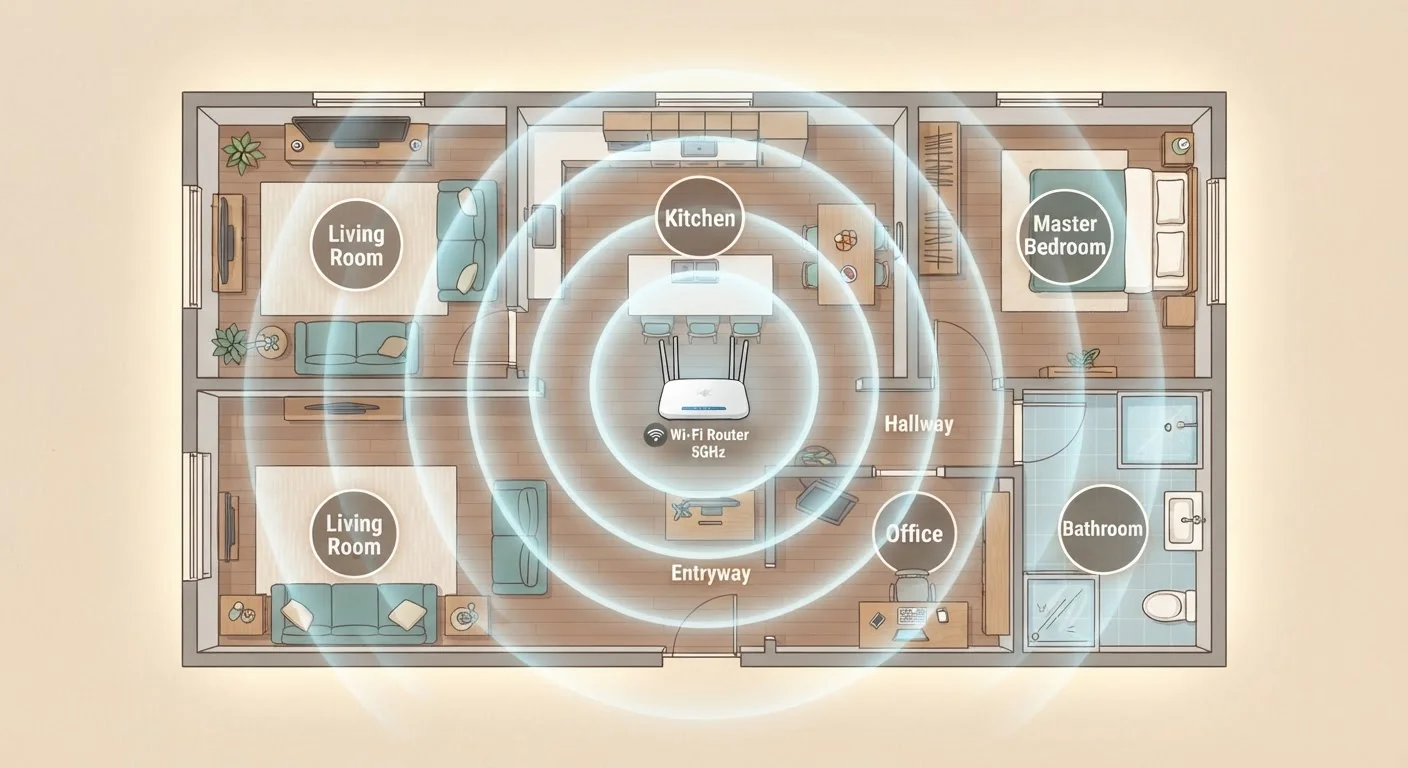
- Placing your router in a central, elevated location meaningfully improves whole-home coverage.
- The 5 GHz band offers faster speeds over short distances; 2.4 GHz travels farther but slower.
- Neighboring Wi-Fi networks can cause interference even when your signal appears strong.
Why Wi-Fi Myths Persist
Wi-Fi is invisible, which makes it easy to misread. When a video buffers or a call drops, people naturally reach for the nearest explanation - the thick wall, the old router, the neighbor's network. Some of those explanations are right. Many are not.
These myths stick around because Wi-Fi behavior is genuinely counterintuitive. A strong signal icon doesn't guarantee smooth streaming. Moving closer to your router doesn't always solve the problem. Understanding what's actually happening inside your wireless network helps you troubleshoot smarter and set realistic expectations.
For a deeper look at how placement decisions affect performance, see why your router's placement shapes every device's experience.
Myth
More bars on my phone means I have a fast connection.
Fact
Signal bars measure how well your device hears the router, not how fast data actually moves.
The bar indicator on your device reflects received signal strength - essentially, how loud the router's radio signal sounds to your device. It says nothing about how much bandwidth is available, how congested the channel is, or how fast your internet plan actually runs. You can have full bars on a very slow internet plan, or on a router that's handling dozens of simultaneous devices. Speed and signal strength are related but distinct measurements, and confusing them leads to misplaced troubleshooting.
Myth
Walls destroy Wi-Fi - the more walls between you and the router, the worse it gets.
Fact
Wall material matters far more than wall count. Drywall barely affects signal; concrete, brick, and metal can block it significantly.
A standard interior drywall partition absorbs very little Wi-Fi energy. Dense materials are the real culprits: concrete, brick, ceramic tile, and metal studs all attenuate wireless signals significantly. A single metal-reinforced wall or a large appliance like a refrigerator can do more damage than several ordinary partition walls. This is why signal maps inside homes can look irregular - the geometry of materials, not just room count, determines how far signal travels.
Myth
The 5 GHz band is always better than 2.4 GHz.
Fact
Each band has genuine trade-offs: 5 GHz is faster at short range, while 2.4 GHz travels farther through obstacles.
The 5 GHz frequency band can deliver noticeably higher data rates when a device is close to the router, and it typically has less interference in dense environments. However, higher-frequency radio waves lose energy more quickly over distance and have more difficulty penetrating solid objects. The 2.4 GHz band carries signal farther and through more obstacles, making it more reliable for devices on the far side of a home. Modern routers often switch devices between bands automatically - a feature sometimes called band steering - to balance these trade-offs without user intervention.
Myth
Restarting your router only helps if something is broken.
Fact
Periodic router restarts can improve performance even on a network that appears to be working fine.
Routers are small computers running software continuously. Over time, memory fills with connection logs, channel assignments can drift, and background processes accumulate. A restart clears this state and allows the router to reassign itself to a less congested Wi-Fi channel - something many routers only do on reboot. Many network engineers recommend a restart every few weeks as routine maintenance, not just when problems surface. It's one of the simplest steps with measurable, if modest, benefits.
Myth
Your neighbor's Wi-Fi network can't affect your speed.
Fact
Nearby networks sharing the same channel compete for the same airspace and can reduce throughput for everyone on it.
Wi-Fi operates on shared radio channels. When multiple routers in the same area broadcast on the same channel, their signals overlap - a condition called channel interference. Each router has to take turns transmitting, slowing down all devices on that channel even when they're connected to their own separate network. In apartments and dense neighborhoods, this effect can be significant. Most modern routers can automatically select a less crowded channel; manually changing the channel through your router's settings is another option worth exploring if congestion is suspected.
Myth
A newer, more expensive router guarantees faster internet.
Fact
A router can only deliver up to the speed your internet plan provides - upgrading hardware beyond that threshold yields no additional speed.
Router hardware determines how efficiently Wi-Fi is distributed inside your home, but it cannot increase the speed arriving from your internet service provider. If your plan delivers 100 Mbps to your home, no router - regardless of price - can push more than that to your devices over Wi-Fi. Where better hardware does help is in handling multiple simultaneous connections, reducing interference, and improving reliability at range. Understanding this distinction helps avoid purchasing decisions driven by marketing claims rather than actual need.
Signal Strength, Speed, and What's Actually in Your Control
Once you move past the myths, a clearer picture emerges: Wi-Fi performance is the product of several overlapping factors - signal strength, channel congestion, router hardware, and the speed your internet service provider actually delivers to your home. No single fix addresses all of them.
2.4 GHz
Band with the longest Wi-Fi range
The 2.4 GHz frequency travels roughly twice as far as 5 GHz in open space, according to general RF engineering principles.
~30%
Signal loss through a single concrete wall
RF signal attenuation studies estimate reinforced concrete can reduce Wi-Fi signal strength by 10-15 dB, which translates to a dramatic drop in usable range.
3-6 ft
Recommended router height off the floor
Placing a router at shelf or table height, rather than on the floor, reduces signal absorption by furniture and flooring materials.
If you're dealing with persistent dead zones, the problem often isn't a weak signal so much as signal that can't navigate your home's layout. Technologies like mesh networks and range extenders address this differently. The comparison of mesh networks, range extenders, and powerline adapters explains the trade-offs clearly.
Evening slowdowns are a separate issue - often tied to neighborhood network congestion rather than anything wrong with your equipment. Why your Wi-Fi slows down in the evening walks through what's behind that pattern.
Don't Mistake Slow Internet for a Wi-Fi Problem
Before repositioning your router or buying new hardware, run a wired speed test directly from your modem. If wired speeds are also slow, the issue is with your internet service, not your Wi-Fi setup. Diagnosing the correct layer of the problem saves time and avoids unnecessary expense.
For tasks that demand consistently low latency - like video calls or online gaming - a wired connection removes several variables at once. Wired vs. wireless: the real difference an Ethernet cable makes covers when the switch is worth it.